


TL;DR — The first thing that touches your API in 2026 is often a coding agent like Claude Code, Cursor, or GitHub Copilot, not a human reading a quickstart. Agents reach for shell binaries before they reach for SDKs, because curl and a CLI binary are the cheapest path from a natural-language task to a working integration. Tools that ship a CLI plus a published Agent Skill (or MCP server) get adopted faster than tools that ship only a dashboard and an SDK. If your product is not reachable from a shell, an agent will invent the integration for you, and the lost adoption is mostly invisible.
A year ago, "developer experience" meant a clean dashboard, a well-documented SDK, and docs that matched reality. In 2026 it means something else. The first thing that often touches your API is not a human reading a quickstart. It is a coding agent, Claude Code or Cursor or Windsurf or GitHub Copilot, deciding in real time whether your product is reachable from a shell.
If the agent cannot reach your product cleanly, it improvises. It writes a brittle requests.post(...) against an endpoint it half-remembers, gets a 400, and moves on. Nobody files a ticket. The lost adoption shows up later, in a different funnel, attributed to nothing in particular.
The terminal has become a primary integration surface because agents use it well. Stripe, GitHub, Vercel, Supabase, and AWS all ship CLIs that humans use and agents can drive. Anthropic's Agent Skills format and the Model Context Protocol ecosystem are formalising the same idea from the other side: if you want an agent to use your product correctly, give it a binary it can call and a playbook it can trust.
The dashboard is for humans. The SDK is for code that humans write. The CLI plus a skill is for the agent that increasingly writes code on the human's behalf.
If your product is not reachable from a shell, an agent will invent the integration for you.
This piece is about why that shift is happening now, what shape a CLI has to be in to survive contact with an agent, and what we shipped at Galtea to meet developers in the terminal where they already work.
The shape of the gap
Three things happened in parallel over the last 18 months, and together they changed the integration story for every AI-product company.
- Coding agents stopped being autocomplete and started being operators. Cursor's agent mode, Anthropic's Claude Code, Windsurf's Cascade, and GitHub Copilot's agent mode all moved past snippet suggestions. By mid-2025 they were reading files, running shell commands, calling APIs, and iterating against results. The 2025 Stack Overflow Developer Survey shows AI tooling has become mainstream among professional developers. The interesting shift is not the headline adoption number, it is the move from autocomplete to agentic, tool-using workflows in the same surveys.
- The agent's hands are bash and HTTP, not your SDK. When an agent needs to do something it does not natively know, it tries the cheapest path. Most of the time that path is a shell command, because shell output is the universal interchange format inside the model's training distribution. Reaching for a language SDK means installing it, importing it, learning its surface, and writing a script the agent then has to execute. A
curlcall or a CLI binary skips all of that. Watch any agent transcript long enough: when the task is "tell me X about service Y," the agent reaches first forgh,stripe,aws,kubectl, orpsql. Python comes later, when the task gets structural. - The contract between agent and tool is now explicit. Anthropic published the Agent Skills format in October 2025, and MCP servers have been multiplying on the same timeline. Both formats answer the same question: how does the model know how to drive this thing? A skill is a
SKILL.mdplus reference docs the agent loads on demand to learn which command to call, which gotchas to avoid, and which workflow to follow. An MCP server exposes a typed tool interface the agent can call directly, no shell required. The two approaches do not compete in a winner-takes-all way; they sit at different points on the same curve from "agent reads the docs at runtime and guesses" to "agent calls a typed function."
The gap, then, is simple. Most SaaS products in the AI space, including Galtea until earlier this year, ship a dashboard and an SDK. The dashboard is for humans clicking through views. The SDK is for humans writing scripts. Neither is what the agent wants first. The agent wants a command it can call without thinking and a playbook that tells it which command to call. Tools that ship that contract get adopted faster. Tools that do not get hallucinated around, and the hallucinations look like adoption losses that no dashboard ever surfaces.
Why the CLI, not (only) the SDK
The instinct inside every AI-product company is to keep doubling down on the SDK. That instinct is not wrong. SDKs are how the ecosystem matured over the last decade. Stripe, Twilio, OpenAI, Anthropic, every infra vendor. They are still the right primitive for the workloads they cover: long-lived applications doing structured work inside a typed language, with concurrency and error handling that a shell pipe cannot express.
What changed is the workload above the SDK. Quick lookups. One-off scripted operations. Multi-step orchestration the developer wants delegated, not authored. Three years ago a human would have opened the dashboard and clicked through five views. That work stayed in the dashboard because writing a Python script for it was disproportionate to the task. Now the agent writes the Python script in the time it takes the human to phrase the question, and in that regime, missing CLI coverage does not mean one missed shell pipe. It means one more failed agent loop.
There are three things a CLI has to get right to be the correct shape for the agent era.
1. Cover the entire API surface, not a curated subset
Hand-curated CLIs (one verb per "important" endpoint) age badly, because the API ships faster than the CLI does. The agent asks for the missing endpoint, gets nothing, improvises, gets it wrong. The fix is auto-generation from an OpenAPI spec, the pattern used by the GitHub CLI, Stripe CLI, and Restish. Every endpoint becomes a command without anyone writing manual wiring code, and when the API ships a new resource on a Tuesday, the CLI ships it the same Tuesday.
2. Feel like the SDK, not like the spec
A raw OpenAPI-derived CLI exposes operation IDs like postProductsV1Create. Readable to the spec, illegible to the agent. Mature CLIs collapse those into <noun> <verb> (gh pr list, stripe products list, aws s3 cp) because that is the shape the agent has already seen ten thousand times in its training data. An agent that has used gh will try galtea products list before reading the docs. It should be right on the first try.
3. Ship a playbook, not just commands
This is the part that feels new in 2026, and it is where most of the launches in this space are still finding their footing. A binary alone is not enough. The agent can get the syntax right and the workflow wrong: pick the wrong evaluation creation path, retry with a per-row filter when it should have used a batch filter, miss the async polling step entirely and report success on a job that has not finished.
A published Agent Skill closes that gap. It is the institutional knowledge of the team that built the API, written for the model that will use it. Anthropic's Agent Skills format is one answer. MCP servers are another. There will be more. What is settled is that some version of this layer is now table stakes: the agent will not figure it out alone, and asking it to is how you ship a tool that gets adopted slowly or not at all.
When the SDK is still the right primitive

The CLI plus skill shift does not mean the SDK retires. If you are instrumenting a production application to capture traces, you want the language SDK and an @trace decorator, not a shell binary you have to invoke from inside your request handler. If you are writing a long-lived service that calls the evaluation API on a schedule with retries and structured error handling, you want types and exceptions, not parsed JSON from subprocess.run. The CLI plus skill is the right primitive for short-lived, ad-hoc, and conversational workloads. The SDK is the right primitive for everything that lives inside a deployed application. The mistake is treating either as universal.
What we shipped, and the bet behind it
Galtea now ships both halves of that contract.
The Galtea CLI is a single galtea binary. Every endpoint in the Galtea API becomes a galtea <noun> <verb> command, generated from the live OpenAPI spec. The mapping follows the same <noun> <verb> convention that gh, stripe, and aws use, so an agent that has driven any of those can guess the right command on the first call.
The Galtea Agent Skill is published in the open-source Galtea-AI/skills repository. It teaches supported coding agents how to authenticate against the CLI, choose the right workflow (creation, evaluation, batch status), batch-poll async jobs without hammering the API, and avoid the gotchas that show up most often in support transcripts.
Both are inspectable on purpose. The model can read the contract. The developer can audit what the model will do before it does it.
The bet is not that the dashboard or the SDK go away. They do not. The dashboard is still the best surface for visual investigation of a complex run. The SDK is still the right primitive for in-process instrumentation. What changes is that the CLI plus the skill becomes the fastest path for quick lookups, scripted workflows, and agent-driven loops, and that path was missing from the platform until now.
The CLI-native Galtea workflow
The easiest way to understand the CLI and the skill is as a shorter path through the same Galtea loop developers already know: connect the product, define what should be tested, run evaluations, inspect failures, repeat.
The dashboard still gives you the visual map. The SDK still instruments the product. The CLI plus the skill gives your terminal, and your coding agent, a way to move through the loop without waiting for you to click. In practice, the path has four moves: install the CLI and the skill, bootstrap product context, run evaluations as scripts, ask the agent for insight from results.
This matters most for people who already think in shell verbs. If your release checklist is a bash script, if your CI pipeline is where quality gates live, or if you would rather ask your agent to summarise failures than open six dashboard filters, this is the path we built for you.
Step 1: make the agent fluent in Galtea
Setup has two pieces, the binary and the playbook.
The Galtea CLI gives your shell a galtea command. Use galtea login for local auth, or set GALTEA_API_KEY in CI and Docker. The Galtea Agent Skill teaches your coding agent how to use that command surface correctly. Install it by asking the agent directly ("Install the Galtea Agent Skill from github.com/Galtea-AI/skills"), or, in Claude Code, through the plugin marketplace.
The sanity check should be boring. Ask your agent: "List my Galtea products and tell me whether the CLI is authenticated." If the agent runs galtea products list and answers in one sentence, you are done. The agent now has hands inside Galtea, and the rest of this section is about what to do with them.
Step 2: bootstrap product context from a natural-language brief
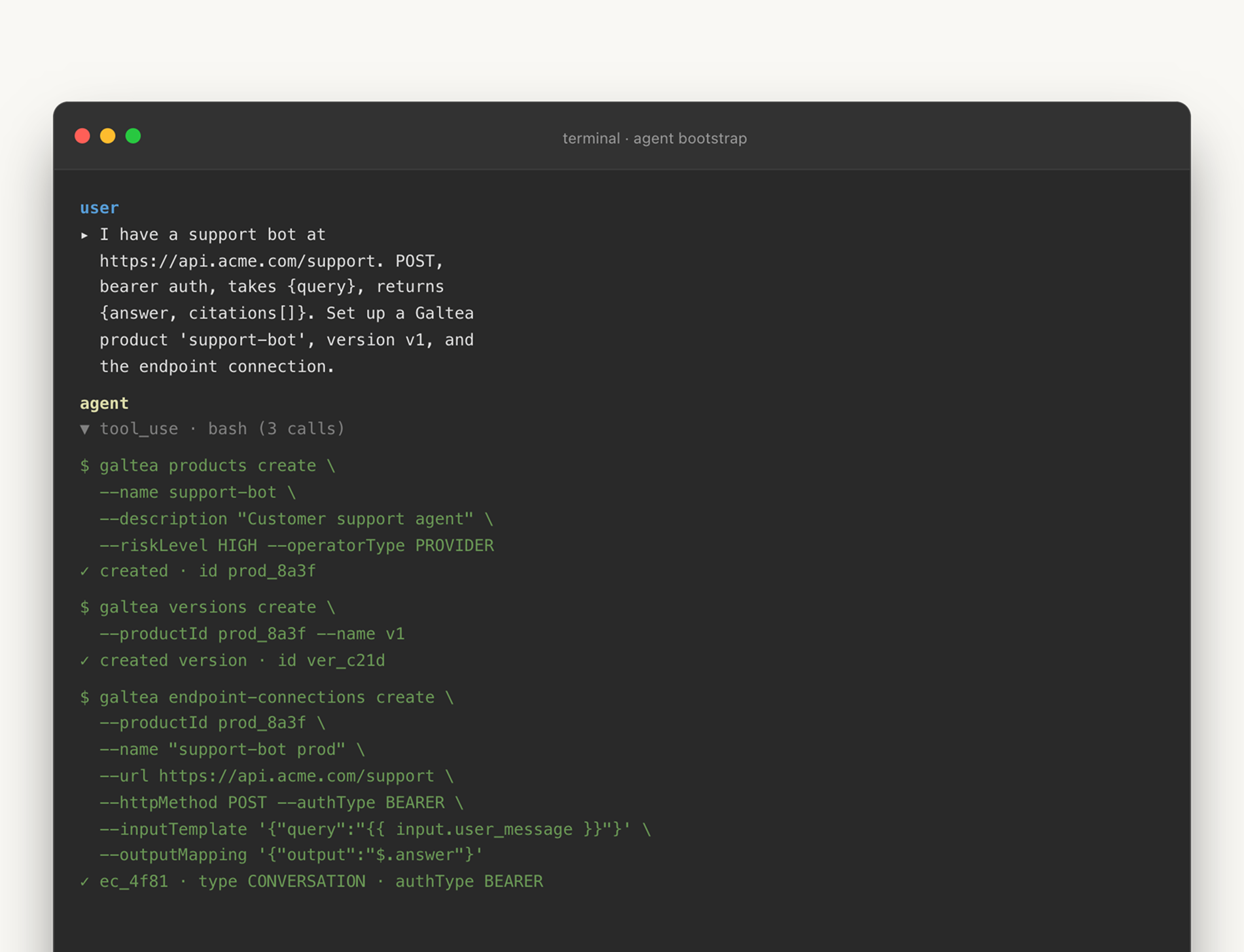
Galtea evaluations need product context: a product, a version, an endpoint connection, and specifications (the document that encodes the system's capabilities, inabilities, security boundaries, and policies). That structure is documented in the docs and is what turns "test my bot" into a reproducible evaluation target.
In the dashboard, that is a guided setup flow. In the CLI-native path, it becomes a conversation with your agent, and, if you want, a script you can rerun. You tell the agent what exists:
"I have a support bot running at this endpoint. It accepts{query}and returns{answer, citations[]}. Set up a Galtea product calledsupport-bot, create versionv1, and connect the endpoint."
The skill's job is to translate that into the right Galtea operations: create the product, attach the version, configure the endpoint connection, and show you the identifiers it will reuse later. If the endpoint is not reachable yet (still in CI, behind a mock, waiting on a deploy), the same pattern works with a mock endpoint during onboarding.
This is also where the split between CLI and SDK stays useful. The CLI manages Galtea entities. The SDK instruments your product. If you want traces (LLM calls, tool calls, intermediate agent steps), the agent should point you to the SDK's @trace decorator and the tracing docs rather than pretend the CLI can see inside your code. A skill that crosses that boundary by accident is worse than no skill at all, because it teaches the agent a wrong mental model.
Step 3: run evaluations as scripts, not rituals
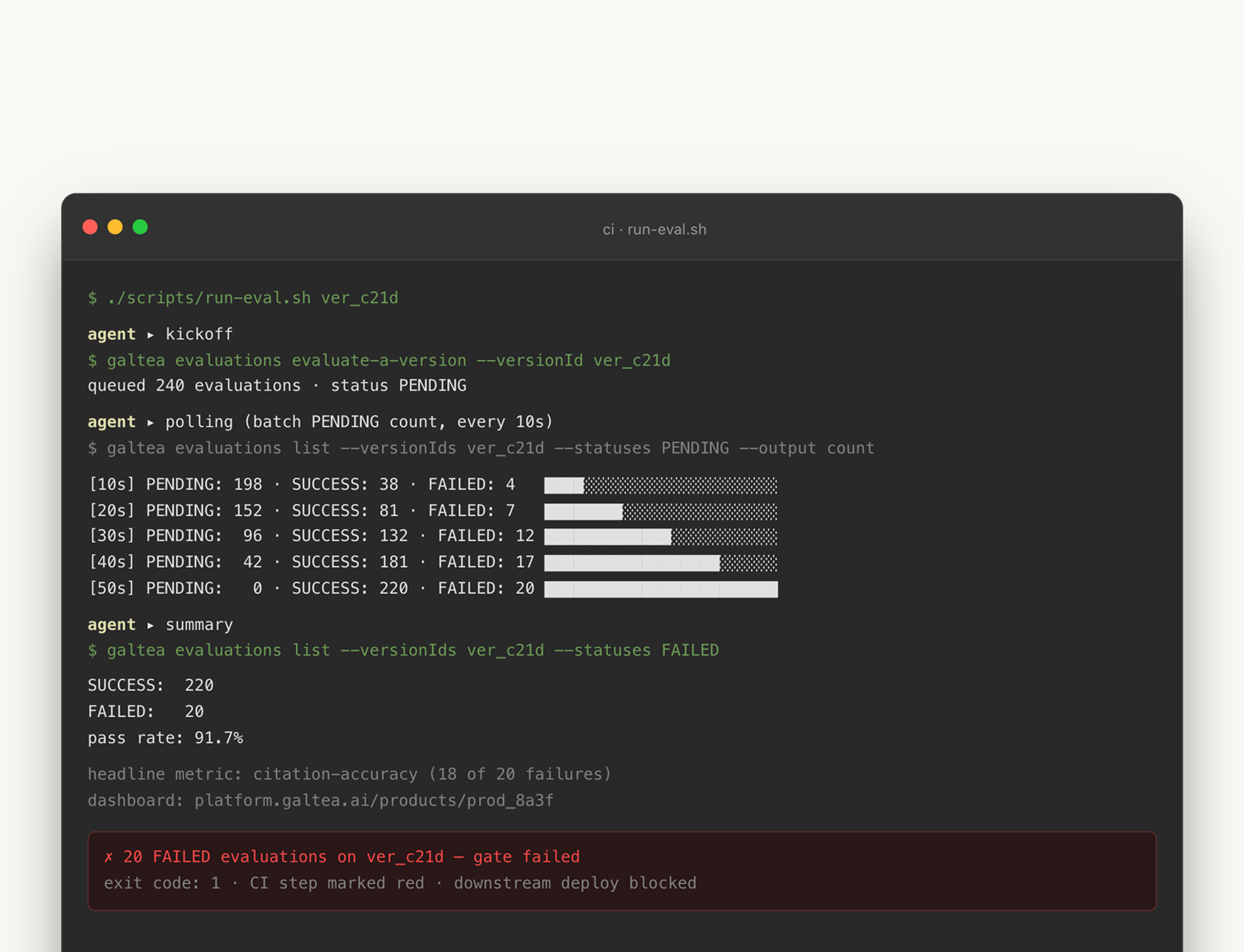
Once the product context exists, the next unit of work is an evaluation run. This is where terminal users feel the difference fastest. Instead of opening the dashboard, picking the right version, starting the run, waiting, refreshing, filtering failures, exporting rows, and pasting them into Slack, you can ask:
"Generate a small shell script that runs a full evaluation for version v1, waits until it finishes, and exits non-zero if any case failed."
The agent can produce that script because the CLI exposes the API as stable, predictable commands, and the skill explains the workflow: which creation path applies, which response is asynchronous, how to poll without hammering the API, and which filters are safe for batch status checks.
The polling detail is the kind of thing that separates a useful skill from a decorative one. Polling one evaluation at a time is technically correct and noisy at scale. The skill nudges the agent toward galtea evaluations list --status running --version v1 over a loop of per-ID checks, because the first is one API call and the second is N.
The script the agent produces looks something like this:
That snippet is roughly what an agent will generate the first time you ask. It is not a finished CI pipeline. It does not handle rate limits, it does not stream output, and the exact subcommand names are subject to the current CLI version (see galtea --help). What it shows is that the dashboard ritual is now a release pipeline primitive. The dashboard remains the place to inspect a complex run visually. The CLI turns the run itself into something a release process can own.
Step 4: ask for insight, not rows
The strongest CLI workflows do not stop at automation. They turn raw evaluation rows into answers, and this is where the agent matters more than the binary. A human can run galtea evaluations list and read JSON. A capable agent can run the same command, group failures by metric, compare two versions, and write the short summary your team actually needs.
Prompts like these stop sounding ambitious and start sounding normal:
- "Give me the failure modes for
support-botover the last seven days, grouped by metric." - "Compare failures between
v1andv2, and tell me whether this looks like a regression or noise." - "Write a Slack-ready summary of the last run, with pass rate, headline failures, and the dashboard link."
None of those is a new Galtea feature in isolation. The platform already had products, versions, metrics, sessions, traces, and evaluations before the CLI shipped. The change is that the terminal can now compose them fast enough for exploratory work. The agent becomes the analyst between the API and the developer: not replacing the dashboard, reducing the number of times you need to open it to learn what question to ask next.
This is the part of the workflow that breaks if the CLI is hand-curated. The agent's third question is always the one the CLI does not yet cover, and the agent's value collapses the moment it has to guess. Auto-generation from the OpenAPI spec is what makes "ask anything" actually work.
The browser becomes the audit trail
This is worth saying directly, because the launch is easy to misread as "the dashboard is dead." It is not. The dashboard moves downstream.
For CLI-native Galtea users, the browser becomes the audit trail and visual debugger. You still open it when you need to inspect a trace timeline, understand metric lineage, browse a specification, or explain a failure to someone who does not live in the terminal. But you should not need a browser tab to answer "what failed last night?", "did this version regress?", "can I rerun these cases with the new version?", or "what should I paste into the release pipeline?"
The dashboard does not disappear in an agents-first workflow. It moves downstream.
That division is healthier for the platform. The dashboard can get better at visual reasoning. The SDK can get better at instrumentation. The CLI can get better at automation. The skill can get better at choosing among them. Each surface does the job it is shaped for, instead of all three doing the same job badly because no one wanted to commit.
What this means if you ship a developer-facing AI product
If you are reading this from outside Galtea, the takeaway is not "ship a CLI." Cargo-culting the surface is how you end up with a hand-curated wrapper around five endpoints, a SKILL.md written by your marketing team, and an agent that still hallucinates.
The takeaway is the contract. Pick the workflow your most engaged users run in the dashboard, watch a coding agent try to do it via your SDK without intervention from start to finish, and write down every place it stalls or improvises. Those are the places where a CLI binary and a published skill would have closed the loop. Then decide whether to ship a CLI, an MCP server, or both, based on what your users' agents actually need. The format is less important than the fact that the contract exists at all.
APIs and SDKs made the GUI optional for power users. Coding agents are making the CLI strategic again. We shipped ours because Galtea users are already building, testing, and releasing AI products inside terminals, and the platform should meet them there. If you already use Galtea, the simplest next step is one terminal session: install the CLI, install the Agent Skill, and ask your coding agent to run one real task you would otherwise do in the dashboard. List products. Set up a throwaway version. Run an evaluation. Summarise the failures. The first time the agent does it correctly, the interface shift stops being an argument and becomes muscle memory.


