


Galtea's generation services build synthetic test cases for AI products. There's a generator for every kind of case we support: behaviour for multi-turn coverage, accuracy generation for RAG and tool calling, security for adversarial inputs. Whichever you pick, you get back a list of test cases ready to evaluate against your agent.
AI agent test case generation has a structural problem that chat evaluation doesn't. Your agent never sees a plain string. It sees a structured payload, an order_id, a requester_type, a session locale, a feature flag, a customer tier. Until recently, every test case Galtea's generators produced came back with a single chat-style user_message and nothing else. That worked for chat assistants. It didn't work for the much larger set of AI agents where the runtime input is a structured payload.
We've added a new stage that closes that gap, and it now runs in every generator. When you provide a JSON Schema for your input, the generator fills every field per test case, using the case's story and the specification under test to pick values that actually exercise the behavior. The rest of this post walks through the design using scenario generation as the worked example, but the same populator runs in every other generator on the platform.
Why AI agent test case generation needs its own stage
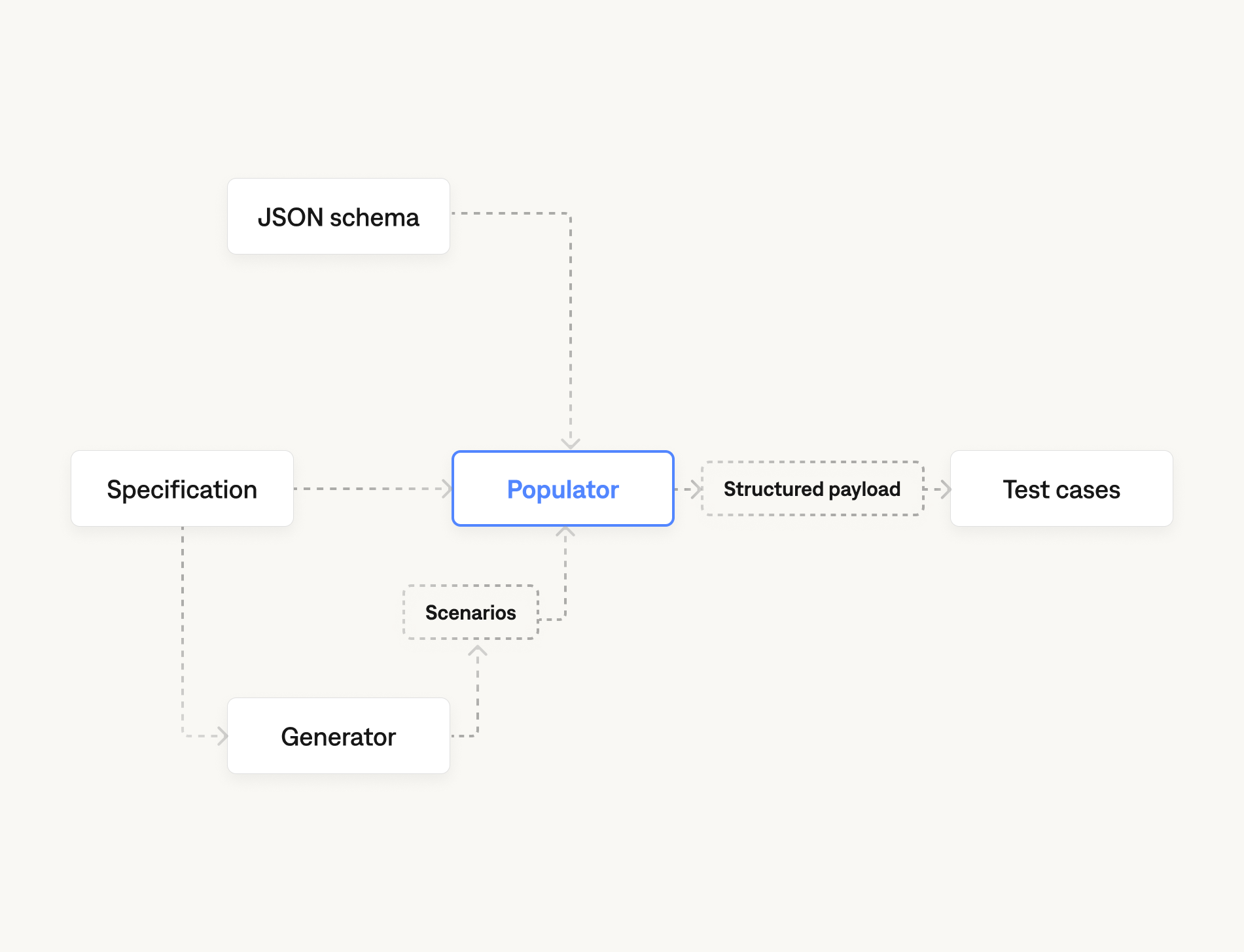
Coverage is the whole point of generating test cases. Each generator already handles coverage at the level it cares about: scenarios are tagged direct, edge, or tangential against the spec, red-teaming cases are tagged by attack class, gold-standard cases are tagged by retrieval or tool-call pattern. The structural problem is what happens after the cases are written.
Take a scenario tagged as a direct hit on a returns policy: a gift recipient asks to return a laptop. As a story it's fine. But your agent never sees the story. Your agent sees a payload, and that payload has a field called requester_type, and if that field is empty or set to a default, you've generated a test case that doesn't actually test the policy.
A populator has to do two things at once.
The first is structural validity. Every value has to satisfy the schema: right type, allowed enum, in-range integer, all required fields present. A JSON-Schema-aware sampler can solve this on its own.
The second is narrative validity. Every value has to match the case's story, and where there's a spec under test, the values have to make the spec genuinely load-bearing. A sampler cannot solve this. The populator needs to read the case and the spec together, then pick values that put the system under stress in the way the case describes.
Generating structured test cases: a worked example
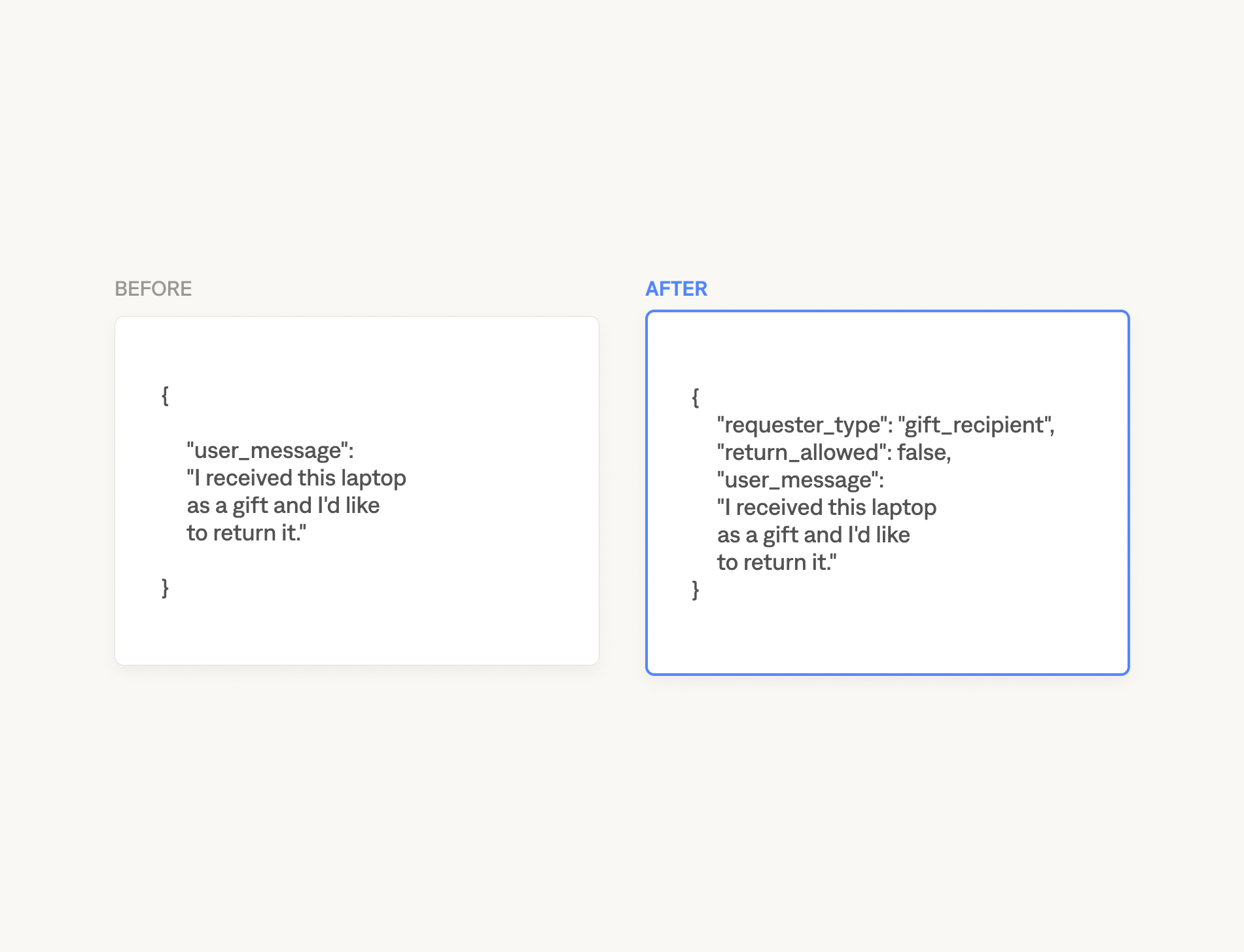
Here is the e-commerce returns case we use internally. The product is a customer support agent for an electronics retailer. The specification is "only the original purchaser may initiate a return; gift recipients must be refused and redirected to the buyer." The schema is intentionally small so it reads in one pass
The generator produces four scenarios across direct, edge, and tangential proximities to the spec. For each, the populator returns a JSON object that conforms to the schema and reflects the scenario.
Scenario 1, direct hit. A gift recipient wants to return a laptop she received three weeks ago.
Scenario 2, direct hit on the other side of the rule. The account holder is returning a monitor she purchased herself.
Scenario 3, edge case. A family member with permission is processing a return on the account holder's behalf.
Scenario 4, tangential. A pre-purchase question about warranty coverage, no return in flight.
A few things are worth pointing out about the populated values. requester_type is never random; it tracks the story of each scenario. return_allowed is set to what the spec says it should be, not what the agent actually returns when run. That's the ground truth your evaluator scores against. And the tangential case still produces a fully valid payload, because the agent under test always sees a payload, even when the user's intent isn't the one the spec covers.
Design choices
A few decisions in the populator that matter if you're integrating it into a pipeline.
Spec-aware mode is the default. When a specification is provided, the populator runs in spec-scored mode. The prompt to the underlying model includes both the case's story and the spec, and the model is told to pick values that make the specification genuinely tested rather than values that sidestep it. Without a spec, the populator falls back to message-grounded mode, which keeps the values consistent with the case's story but doesn't try to stress any particular rule.
The populator uses structured outputs, not parsing. A Pydantic model is built dynamically from your JSON Schema and passed as the response model on the LLM call. There is no JSON-from-string parsing, no retry-on-malformed-output loop. The model returns a value that validates against your schema, or the call fails loudly.
Session-wide fields are routed separately. Real systems often have payload fields that are constant for the life of a session: language, region, customer tier, feature flags. The populator respects an x-galtea-is-session-wide: true annotation on any property in your schema. Annotated fields are populated once per case and routed to a separate context object, so the harness can store them per-session instead of per-turn.
How to generate AI agent test cases with Galtea
The dashboard is the easiest path. When you create a test, paste your JSON Schema into the Input Schema field in the endpoint connection, pick "Generated by Galtea" add one your specifications, and run.
If you're building an AI product that takes anything richer than a chat string, this should let you skip the step where you write your own glue between generated test cases and your runtime input.


